Install
Before you start: the screen is connected (What you need), the Pi runs Raspberry Pi OS "trixie" and is on your home network.
Run the install
- Log in to the Pi: with a keyboard and screen on the Pi, or from another computer with SSH (
ssh <user>@<the Pi's name or address>). -
Run this command. It downloads PaperPi's install script and runs it with
sudo(as administrator, so it can install programs):curl -fsSL https://raw.githubusercontent.com/txoof/PaperPi/main/install/paperpi-install | sudo bash -
Answer its questions. Type the number of your answer and press Enter;
bgoes back to the question before.- Which screen is connected?
1for a screen with the IT8951 board,2for a small screen on the e-Paper HAT,0if none is connected yet (you choose it later in the web interface). - Which size? The size in inches, as on the box. For a small screen, the menu uses Waveshare's way of writing it:
7in5is 7.5 inch. - For a small screen: which model of that size, such as
7in5_V2. The version ("V2") is on the screen's box or the sticker on its back. The tested models come first. - For an IT8951 screen: the vcom, the number printed on the screen's ribbon cable, for example
-1.90. - Install what is missing? The install needs a few programs from Raspberry Pi OS (
git,python3-venv,gcc,python3-dev). Press Enter to install them.
- Which screen is connected?
- Wait. The install switches on SPI (the data line to the screen), installs PaperPi and starts it; this takes a few minutes on a Pi 3. If SPI needs a restart of the Pi to work, the install asks first and PaperPi starts by itself after the restart.
What the screen shows
For the first minute, PaperPi's name, version and the address of its web interface. Then a clock and this set-up screen take turns:
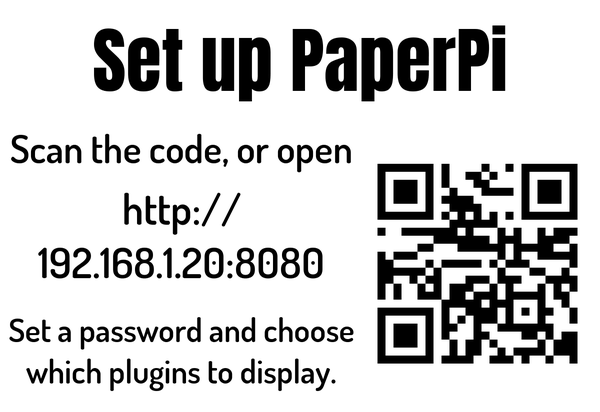
Scan the QR code with your phone's camera, or type the address into a browser on a phone or computer on the same home network. Then go on with First setup.
The screen stays blank or shows nothing new? Check that PaperPi runs: systemctl status paperpi should say active (running). The log of the last minutes: journalctl -u paperpi -n 50.
Install without questions
To install from another script, download the install script and give the answers as options. --yes asks nothing and uses no screen (the virtual screen, which only saves pictures) unless --display names one:
curl -fsSLO https://raw.githubusercontent.com/txoof/PaperPi/main/install/paperpi-install
sudo bash paperpi-install install --yes --display it8951 --model 9.7 --vcom -1.90
sudo bash paperpi-install install --yes --display waveshare --model epd7in5_V2
sudo bash paperpi-install --help lists every option. The model names of the small screens are on Supported screens.
Already installed?
The install keeps a config that is already there (in /etc/paperpi, from an earlier install) and asks nothing about the screen. To update PaperPi, use Update and remove. What the install puts where: How the service works.