Calendar
Type ical_calendar · needs the internet · set up first: First copy each calendar's secret iCal address from Google Calendar, Outlook.com or iCloud; the README shows where..
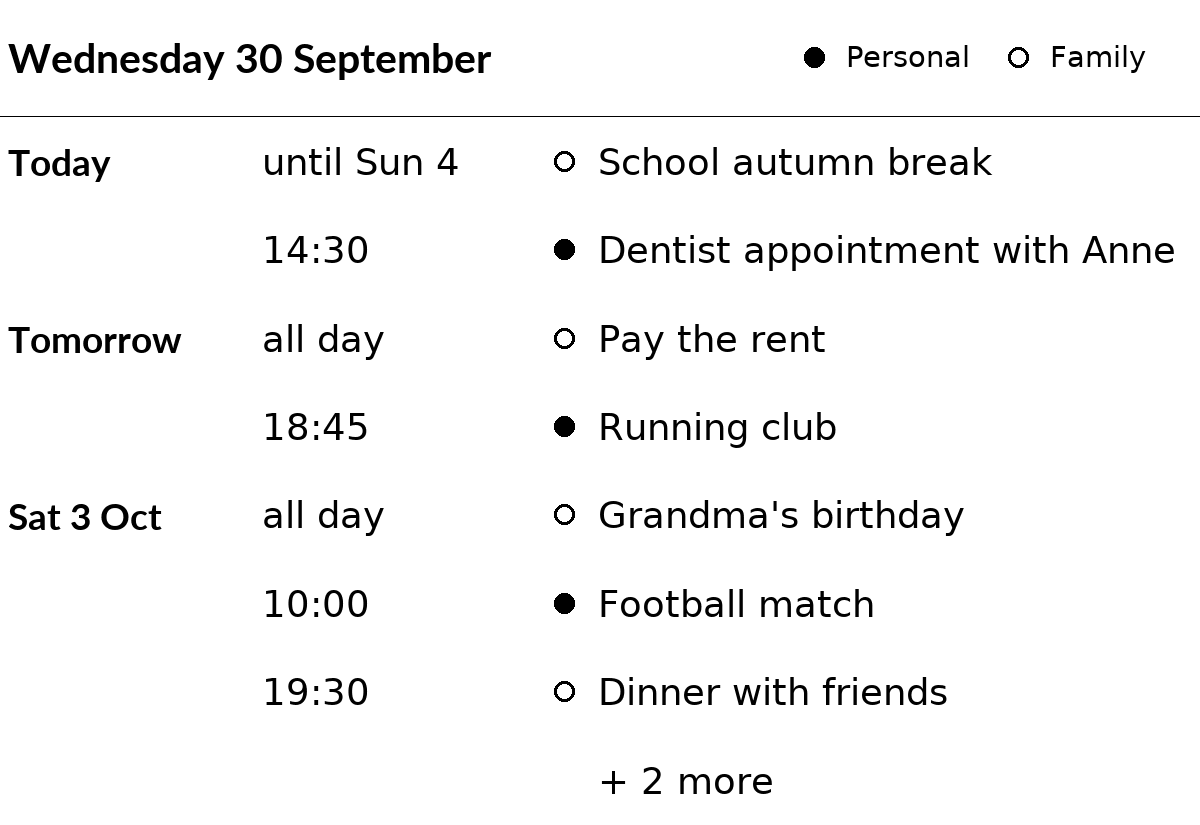
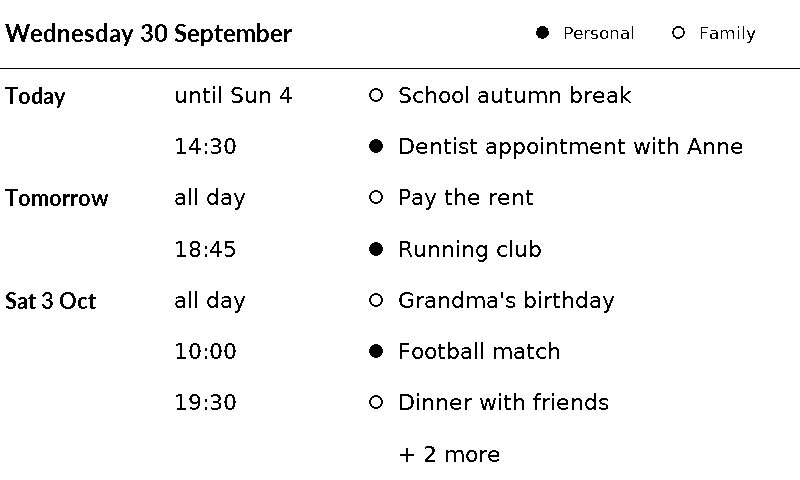
The next events from one, two or three calendars, merged into one list sorted by time: today's date at the top, then one row per event with its day, its time and its title. Each day is named once ("Today", "Tomorrow", "Sat 3 Oct"); all-day events come first on their day.
With two or three calendars, each event has its calendar's mark before the title: a filled circle for calendar_1, an open circle for calendar_2, a filled square for calendar_3. The top right shows each mark with the calendar's name ("Personal", "Family"), from the settings name_1 to name_3 ("Calendar 1" when a name is not set). With one calendar there are no marks.
It works with any calendar that gives an iCal address (iCal is the standard file format for calendars; such files end in .ics, the addresses don't always): Google Calendar, Outlook.com, iCloud, Nextcloud, Fastmail and others. No login is needed.
Getting the address
Each calendar has a secret address: a web address that gives its events to anyone who has it, without a login. Treat it like a password.
In Google Calendar (on a computer, at calendar.google.com):
- Click the gear icon at the top right, then Settings.
- On the left, under "Settings for my calendars", click the calendar.
- Scroll to Integrate calendar and copy Secret address in iCal format (it ends in
/basic.ics).
Only the owner of a calendar, and people who may "make changes and manage sharing", see this address. For a calendar someone else shared with you, ask them to give you that permission, or to copy the address for you. Work and school accounts may have it switched off by their administrator.
If the address ever gets out, click Reset next to it in the same place: the old address then stops working. Put the new one in the plugin's settings.
Outlook.com: Settings (gear icon), Calendar, Shared calendars. Under Publish a calendar, choose the calendar and "Can view all details" (or similar wording), click Publish, and copy the ICS link. Unpublish in the same place stops the old link.
iCloud (on an iPhone or iPad): in the Calendar app tap Calendars, tap (i) next to an iCloud calendar, turn on Public Calendar and tap Share Link to copy it. The link starts with webcal://, which the plugin accepts. Turning Public Calendar off stops the link.
These links work like Google's secret address: anyone who has one can see the calendar.
Addresses must start with https:// or webcal://. http:// is not encrypted, so anyone on the way could read the secret address; it only works for a server on the home network (such as http://192.168.1.5/... or http://nas.local/...).
Why not a normal Google login? Google doesn't allow the "enter a code on your phone" login for calendars, and a login made for a single household (an app Google hasn't checked and approved) stops working every 7 days. The secret address avoids both.
Updates and the saved events
The plugin downloads each calendar at every update. Google sends the whole calendar, back to its first event, so a calendar used for some years is about 1 MB, and reading it takes about 5 seconds on a Raspberry Pi 4. With three large calendars, an update may take 20 to 30 seconds; on a Pi 3, raise time_limit (the seconds one update may take, 60 unless changed) if updates are stopped. A calendar file larger than 8 MB is refused: the Pi could not read it within the time limit.
It suggests an update every 30 minutes (change it with the refresh setting, in seconds), so a new event can take up to half an hour to show.
After each download, the plugin saves that calendar's events of the coming days in its storage folder. When a calendar can't be downloaded, its saved events are shown instead, for up to one day; PaperPi's log says so. Saved events are not used for another address, or after a change of days.
When a calendar can't be downloaded and has no saved events (the first update, a mistyped address, or offline for more than a day), the other calendars are still shown, and the last row says so ("Family: not updated"); the log says why. When every calendar fails, the update fails as usual and the error is in the log.
Anyone can send an invitation, and Google adds invitations to the calendar, so some events are left out to keep the Pi working: events without a start time or with impossible times, and events that repeat every hour or more often (working those out would keep the Pi busy for minutes). Cancelled events are left out too. An event without a title shows "(no title)"; titles are cut at 200 characters.
Layouts
| Layout | Shows |
|---|---|
list (default) |
today's date and the calendars' marks and names, then the next 8 events: day, time and title |
small |
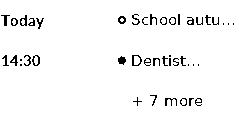
for tiny screens (2" to 3"): the next 3 events, with the day and time in one column ("18:45", "Thu 18:45", or "Today" / "Thu 1" for all-day events; 12-hour times are shortened to "6:45p"); the marks but not the names |
When there are more events than rows, the last row says how many more there are ("+ 3 more"). With no events: "Nothing planned for the next 7 days".
The time column shows:
- the start time ("14:30", or "2:30 PM" with hours = 12);
- "all day" for an all-day event of one day;
- "until Sun 4" for an all-day event of more days ("ends today" on its last day);
- for a timed event that started on an earlier day and is still going: "until 10:00" (it ends today), "ends today" (at midnight) or "until Sun 4".
All text of a layout has one size, which depends on the size of the screen. A title that is too long is cut ("…"). Times are shown in the Pi's own time zone.
Settings
| Setting | Default | Meaning |
|---|---|---|
calendar_1 |
none, required | secret iCal address of a calendar, starting with https:// or webcal:// |
calendar_2 |
none | secret iCal address of a second calendar, shown in the same list |
calendar_3 |
none | secret iCal address of a third calendar, shown in the same list |
name_1, name_2, name_3 |
"" |
short name of each calendar, shown next to its mark, e.g. "Family" (at most 20 characters) |
days |
7 |
how many days to show, starting today (1 to 31) |
hours |
24 |
24 (15:45) or 12 (3:45 PM) |
The addresses are secret settings: the web interface shows them as password fields, and PaperPi never writes them in its log. Error messages name only the server ("calendar.google.com answered 404 Not Found"). A 404 usually means the address was reset.
In the config file (every other setting is in the settings reference):
[[plugin]]
id = "ical_calendar-47398d0f"
name = "Calendar"
type = "ical_calendar"
calendar_1 = "https://calendar.google.com/calendar/ical/.../basic.ics"
calendar_2 = "https://calendar.google.com/calendar/ical/.../basic.ics"
name_1 = "Personal"
name_2 = "Family"
days = 5
Try it without a screen: uv run paperpi render ical_calendar (sample data), or with real data: uv run paperpi render ical_calendar --live --set calendar_1=<address>. An address typed on the command line stays in the shell's history (and other users of the Pi can see it while the command runs), so prefer the config file or the web interface for real addresses.
All settings
Made from the plugin's code, so always up to date.
| Setting | Default | What it does |
|---|---|---|
calendar_1 |
required | Secret iCal address of a calendar (starts with https:// or webcal://). The plugin's README shows where to find it in Google, Outlook and iCloud (required) |
calendar_2 |
not set | Secret iCal address of a second calendar (or leave empty) |
calendar_3 |
not set | Secret iCal address of a third calendar (or leave empty) |
name_1 |
not set | Short name of the first calendar, e.g. Personal |
name_2 |
not set | Short name of the second, e.g. Family |
name_3 |
not set | Short name of the third, e.g. Work |
days |
7 |
How many days to show, starting today |
hours |
24 |
12-hour (3:45 PM) or 24-hour (15:45) times |
Its suggestions for settings every plugin has (a block that sets one of them uses that value instead):
| Setting | Default | What it does |
|---|---|---|
refresh |
1800 |
Seconds between updates (at least 5). Leave it out to use the plugin's suggestion |
level |
"rotation" |
When it is shown: alert, interrupt or rotation. Leave it out to use the plugin's suggestion |
layout |
"list" |
Which layout (see the plugin's page). Leave it out to use the first |
storage_mb |
500 |
Most megabytes this plugin may keep in its storage folder; over it, the files changed longest ago are removed first. Leave it out to use the plugin's suggestion |
storage_days |
30 |
Files the plugin has not changed for this many days are removed (0 = keep them). Leave it out to use the plugin's suggestion |
Sample images
The sample data is made up: a week in Berlin from two calendars, "Personal" and "Family", on a Wednesday at 09:15, with an autumn break that started on Saturday. All sample images are in tests/images/, named ical_calendar-<layout>-<screen>.png, where <screen> is 9in7 (9.7", 1200x825, 16 grays), 7in5 (7.5", 800x480, black and white) or 5in65 (5.65", 600x448, 7 colours).
list, 9.7" |
list, 7.5" |
small, 2.13" (250x122) |
|---|---|---|
 |
 |
 |
The small layout is also drawn on the usual three test screens, where it looks large.