Dutch public transport
Type nl_openbaar_vervoer · needs the internet.
When the next buses, trams and trains leave in the Netherlands, from up to four stops and on up to two train routes, and when to leave the house to catch them.
Layouts
| Layout | Shows |
|---|---|
sections (default) |
a heading per stop or train route (with the walking time when set), then its next departures; disruptions and planned works on the train routes on the bottom line |
by_time |
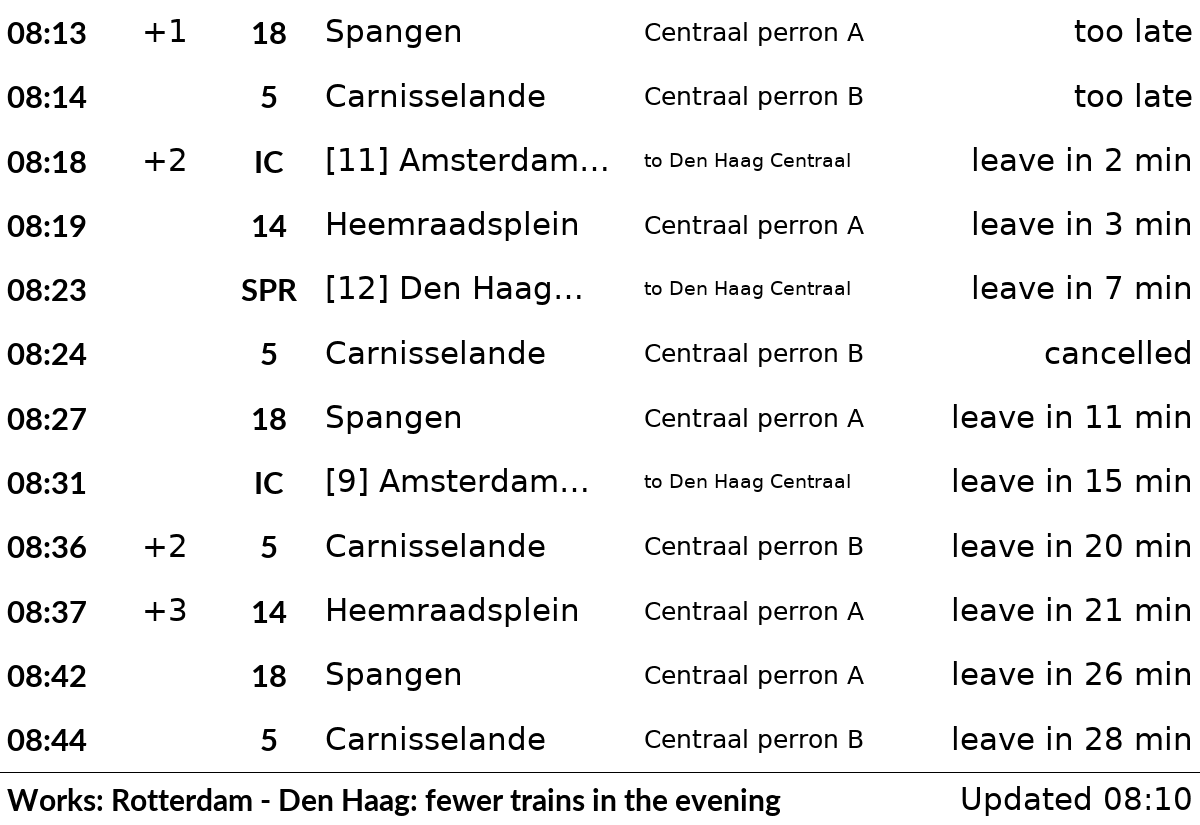
the departures of all stops and routes in one list, the soonest first, with the stop's heading on each row (to Den Haag Centraal for a train route). Departures that already left are left out; cancelled ones and ones you can't reach any more (too late) stay in. A stop or route with a problem (for example Stop not found) comes first |
next |
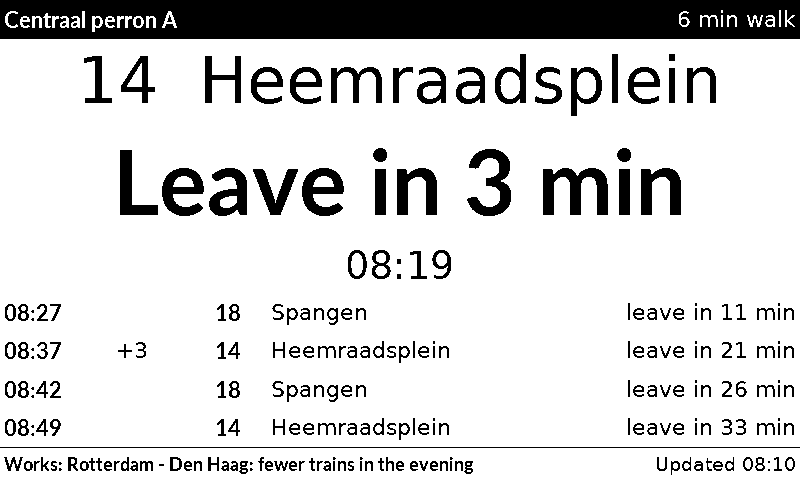
only the first stop or route shown today. The next departure you can still catch is shown large: the line and where it goes, Leave in 3 min (or Leaves in 9 min without a walking time) and its time; the 4 after it are small rows below. Only this stop or route is fetched, and only its disruptions show (and count for alert_on_disruption). For more stops in this layout, add one plugin entry per stop |
Choose one with layout = "by_time" in the plugin's entry (or on its settings page).
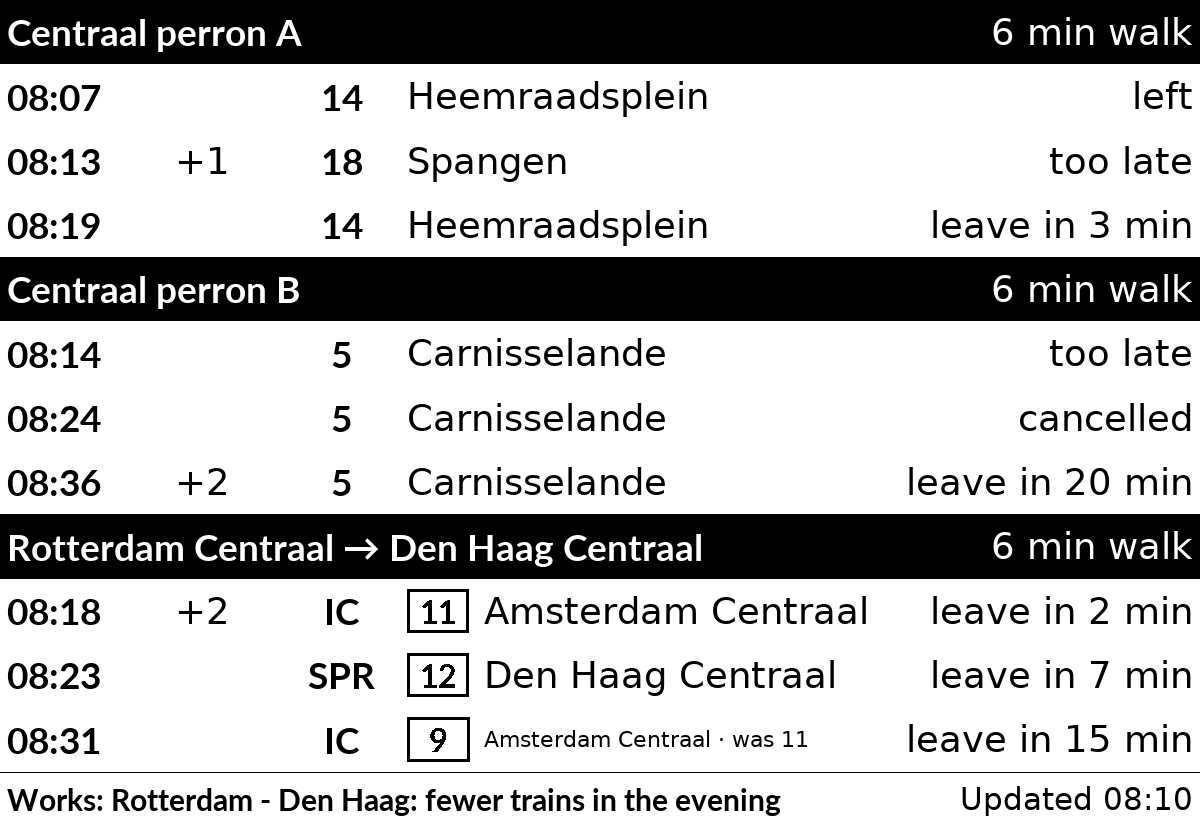
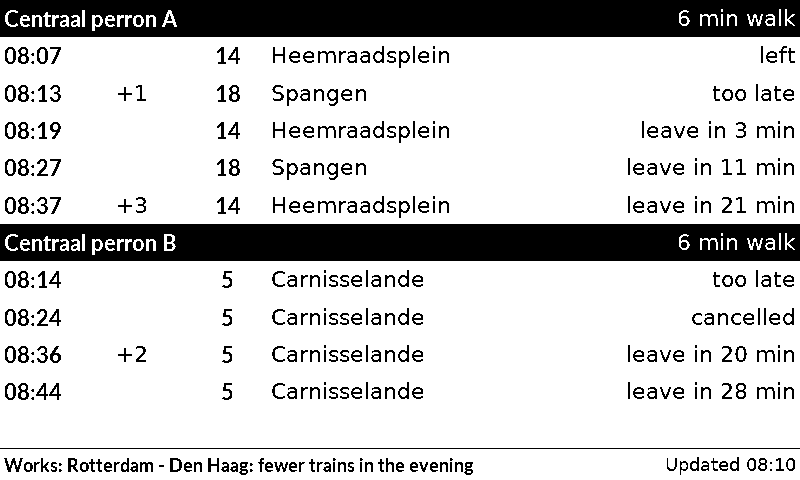
Each stop gets a heading, then one row per departure: the expected time, the delay in minutes (+3), the line, where it goes, and a note. For a train the row shows the type (IC, SPR), the platform in a box as on NS's signs, and the station the train is signed with (Groningen), which is often beyond your destination; Groningen · was 7 when the platform changed. In the "one list by time" layout the platform is in brackets ([7] Groningen), and in "next departure large" after the time (08:18 · spoor 7). The notes:
leave in 3 minorleave now: when you set a walking time for the stop.too late: you can't reach it any more.left: it left in the last 5 minutes (or its time has passed).cancelled: it doesn't run.
The bottom line says when the times were fetched, after any disruptions (Disruption: ...) or planned works (Works: ...) that NS reports for both stations of a train route. When OVapi or NS can't be reached, the plugin shows the departures it saved, for up to 30 minutes, and the bottom line says "Not updated since 08:10".
The times come from OVapi, a free service run by volunteers with the live times of all Dutch buses and trams. It needs no account or key. It asks for at most one request a minute: the plugin updates every 90 seconds, and with a shorter refresh it asks OVapi at most once a minute and shows the saved times in between.
Trains come from the NS API, which needs a free key (see "Getting an NS key"). The key allows 5,000 requests a day. Each train route takes one or two requests (NS sends 5 trips at a time). Train times are asked for at most every 85 seconds, whatever the refresh (so every 90 seconds with the default), and disruptions every 10 minutes, so two routes stay under about 4,400 requests a day.
Settings
| Setting | Default | What it does |
|---|---|---|
stop_1 |
empty | Code of the stop: one side of the street, so one direction. See "Finding a stop" |
name_1 |
the stop's name | Heading shown above its departures, e.g. Tram 9 |
lines_1 |
all lines | Only these lines, e.g. "9, 12" |
walk_1 |
0 (off) |
Minutes to walk to the stop; each row then says when to leave |
days_1 |
every day | Days on which the stop is shown, e.g. ["mon", "tue", "wed", "thu", "fri"] |
stop_2 ... stop_4 |
empty | Up to three more stops, each with its own name_, lines_, walk_ and days_ |
ns_key |
empty | NS API key, needed for trains. Kept secret: it is never shown in the web interface or the log |
train_from_1, train_to_1 |
empty | NS codes of the stations of train route 1, e.g. GVC (Den Haag Centraal) and UT (Utrecht Centraal). See "Finding a station" |
train_walk_1 |
0 (off) |
Minutes to walk or cycle to the station; each row then says when to leave |
train_days_1 |
every day | Days on which the route is shown |
train_changes_1 |
false |
Also show trips with a change of train (Uitgeest · 1 change); off: direct trains only |
train_from_2 ... |
empty | A second route, with the same settings ending in _2 |
alert_on_disruption |
false |
While NS reports a disruption on a train route shown today, show the plugin as an alert (before the other plugins). Planned works don't count |
ahead |
60 |
Minutes ahead to show departures for (10 to 80) |
The plugin needs at least one stop or one train route. In the sections layout, the stops and routes shown today share the screen, stops first: one gets 11 rows, two get 5 each, three get 3, four get 2, five or six get 1. With 1 or 2 rows, departures that already left are left out. On a day when none is shown, the plugin has nothing to show and the other plugins take its turn.
[[plugin]]
id = "nl_openbaar_vervoer-6e1f3b92"
type = "nl_openbaar_vervoer"
stop_1 = "31001118"
name_1 = "Centraal perron A"
lines_1 = "14, 18"
walk_1 = 6
stop_2 = "31001039"
name_2 = "Centraal perron B"
walk_2 = 6
days_2 = ["mon", "tue", "wed", "thu", "fri"]
ns_key = "your key"
train_from_1 = "RTD"
train_to_1 = "GVC"
train_walk_1 = 6
train_days_1 = ["mon", "tue", "wed", "thu", "fri"]
Setting the walking time
walk_1 (and train_walk_1 for a train route) is the number of minutes from your front door to standing at the stop or on the platform. The plugin takes it off each departure time: a tram at 08:20 with walk_1 = 6 says "leave in ..." until 08:14, then "too late".
To estimate it:
- Time it once: walk to the stop at your normal pace, and note the minutes. Or ask a map app (OpenStreetMap, Google Maps) for the walking time from your address to the stop.
- Add what the walk or the map leaves out: putting on a coat and locking the door, waiting at a traffic light, and for a train the stairs or lift to the platform (2 to 5 minutes at a big station).
- Add a minute to spare. The screen updates every 90 seconds, so "leave in 3 min" can be up to 90 seconds old.
For example, 5 minutes on the map, plus 1 for the door and 1 to spare, gives walk_1 = 7. If you often arrive just as the tram leaves, make it a minute or two longer. Leave it at 0 to show only the times, without "leave in".
Getting an NS key
- Make a free account at https://apiportal.ns.nl (Sign up).
- Under Products, open Ns-App and subscribe to it.
- Under your Profile, copy the Primary key into
ns_key(or the NS key field on the plugin's settings page).
Finding a stop
On the plugin's settings page, each stop has a search box above its code:
- Type the stop's name, e.g.
Rotterdam CentraalorAmsterdam Dam, and press Search (or Enter). Typos are fine. When many towns have a stop of that name, the list says so: add the town. - The list shows each side of the street as its own choice, with the lines and destinations that leave there in the next hour, and a link to see it on a map. Pick the side whose lines go your way and press Use.
- Use fills in the stop's code and empties its heading and lines (they belonged to the stop chosen before; an empty heading shows the stop's own name). Nothing is saved yet: change what you like, press Preview, then Save.
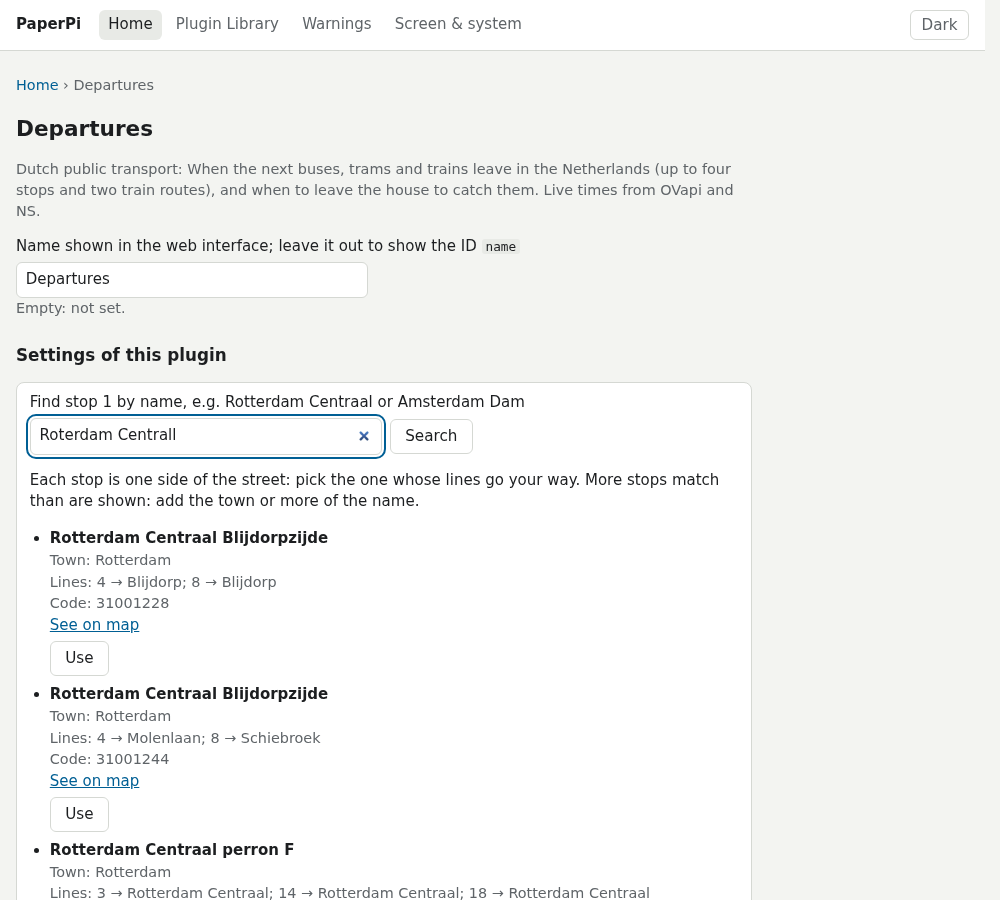
The search downloads OVapi's list of stops (about 650 kB) and then asks for the best matches, so the name you type goes to OVapi. A stop missing from that list (see "Limits") can't be found this way.
Without the web interface, look the code up in OVapi:
- Open http://v0.ovapi.nl/stopareacode and search the page for your stop's name (with your browser's Find), for example
Rotterdam Centraal perron A. Note itsStopAreaCode, e.g.4862. - Open
http://v0.ovapi.nl/stopareacode/4862(with your code). It lists each side of the street, under a number such as31001118, with the lines and destinations that leave there. Pick the side that goes your way. - Put that number in
stop_1.
Finding a station
Every Dutch station has a short code, such as ASD (Amsterdam Centraal), RTD (Rotterdam Centraal), GVC (Den Haag Centraal) and UT (Utrecht Centraal). On the settings page, each station of a train route has a search box: type the name (DH Centraal and utrcht cs work too), press Search, and Use the right one. The search asks NS for its list of stations, so fill in ns_key first (the box says so until you do); one search is one of the key's 5,000 requests a day.
Without the web interface: Wikipedia's list of railway stations in the Netherlands gives the code of each one ("afkorting").
Limits
- Some stops are missing from OVapi's list of stop names (for example Padualaan in Utrecht), and the Utrecht trams showed no data in a test in October 2026.
- Times on the screen are as old as the last update: with the default
refreshof 90 seconds, "leave in 3 min" can be up to 90 seconds old. - A route shows the trips NS's journey planner suggests, the same ones the NS app shows.
All settings
Made from the plugin's code, so always up to date.
| Setting | Default | What it does |
|---|---|---|
stop_1 |
not set | Code of stop 1: one side of the street, e.g. 31001118 (or leave empty) |
name_1 |
not set | Heading of stop 1 (empty: its name) |
lines_1 |
not set | Lines to show at stop 1, e.g. 9, 12 (empty: all lines) |
walk_1 |
0 |
Minutes from your front door to stop 1, with a minute to spare (0: off). Each row then says when to leave. See the README for how to estimate it |
days_1 |
["mon", "tue", "wed", "thu", "fri", "sat", "sun"] |
Days on which stop 1 is shown |
stop_2 |
not set | Code of stop 2: one side of the street, e.g. 31001118 (or leave empty) |
name_2 |
not set | Heading of stop 2 (empty: its name) |
lines_2 |
not set | Lines to show at stop 2, e.g. 9, 12 (empty: all lines) |
walk_2 |
0 |
Minutes from your front door to stop 2, with a minute to spare (0: off). Each row then says when to leave. See the README for how to estimate it |
days_2 |
["mon", "tue", "wed", "thu", "fri", "sat", "sun"] |
Days on which stop 2 is shown |
stop_3 |
not set | Code of stop 3: one side of the street, e.g. 31001118 (or leave empty) |
name_3 |
not set | Heading of stop 3 (empty: its name) |
lines_3 |
not set | Lines to show at stop 3, e.g. 9, 12 (empty: all lines) |
walk_3 |
0 |
Minutes from your front door to stop 3, with a minute to spare (0: off). Each row then says when to leave. See the README for how to estimate it |
days_3 |
["mon", "tue", "wed", "thu", "fri", "sat", "sun"] |
Days on which stop 3 is shown |
stop_4 |
not set | Code of stop 4: one side of the street, e.g. 31001118 (or leave empty) |
name_4 |
not set | Heading of stop 4 (empty: its name) |
lines_4 |
not set | Lines to show at stop 4, e.g. 9, 12 (empty: all lines) |
walk_4 |
0 |
Minutes from your front door to stop 4, with a minute to spare (0: off). Each row then says when to leave. See the README for how to estimate it |
days_4 |
["mon", "tue", "wed", "thu", "fri", "sat", "sun"] |
Days on which stop 4 is shown |
ns_key |
not set | NS API key needed for trains. See the README for information on obtaining a free key |
train_from_1 |
not set | NS code of the station train route 1 goes from, e.g. GVC (Den Haag Centraal) (or leave empty) |
train_to_1 |
not set | NS code of the station train route 1 goes to, e.g. UT (Utrecht Centraal) (or leave empty) |
train_walk_1 |
0 |
Minutes from your front door to the platform of train route 1, walking or cycling, with a minute to spare (0: off). See the README for how to estimate it |
train_days_1 |
["mon", "tue", "wed", "thu", "fri", "sat", "sun"] |
Days on which train route 1 is shown |
train_changes_1 |
false |
Train route 1: also show trips with a change of train (off: direct only) |
train_from_2 |
not set | NS code of the station train route 2 goes from, e.g. GVC (Den Haag Centraal) (or leave empty) |
train_to_2 |
not set | NS code of the station train route 2 goes to, e.g. UT (Utrecht Centraal) (or leave empty) |
train_walk_2 |
0 |
Minutes from your front door to the platform of train route 2, walking or cycling, with a minute to spare (0: off). See the README for how to estimate it |
train_days_2 |
["mon", "tue", "wed", "thu", "fri", "sat", "sun"] |
Days on which train route 2 is shown |
train_changes_2 |
false |
Train route 2: also show trips with a change of train (off: direct only) |
alert_on_disruption |
false |
Show this plugin as an alert while NS reports a disruption on a train route (not for planned works) |
ahead |
60 |
Minutes ahead to show departures for |
Its suggestions for settings every plugin has (a block that sets one of them uses that value instead):
| Setting | Default | What it does |
|---|---|---|
refresh |
90 |
Seconds between updates (at least 5). Leave it out to use the plugin's suggestion |
level |
"rotation" |
When it is shown: alert, interrupt or rotation. Leave it out to use the plugin's suggestion |
layout |
"sections" |
Which layout (see the plugin's page). Leave it out to use the first |
storage_mb |
500 |
Most megabytes this plugin may keep in its storage folder; over it, the files changed longest ago are removed first. Leave it out to use the plugin's suggestion |
storage_days |
30 |
Files the plugin has not changed for this many days are removed (0 = keep them). Leave it out to use the plugin's suggestion |
Sample images
The sample data is made up: the two tram platforms at Rotterdam Centraal on a Saturday at 08:10, and the trains to Den Haag Centraal with planned works, with a 6-minute walk. All sample images are in tests/images/, named nl_openbaar_vervoer-<layout>[-two-stops|-stops-and-train]-<screen>.png, where <screen> is 9in7 (9.7", 1200x825, 16 grays), 7in5 (7.5", 800x480, black and white) or 5in65 (5.65", 600x448, 7 colours). Without two-stops or stops-and-train, only the first platform is set.
| 9.7" | 7.5" |
|---|---|
 |
 |
 |
 |